
How to add Tab or Enter after a scan
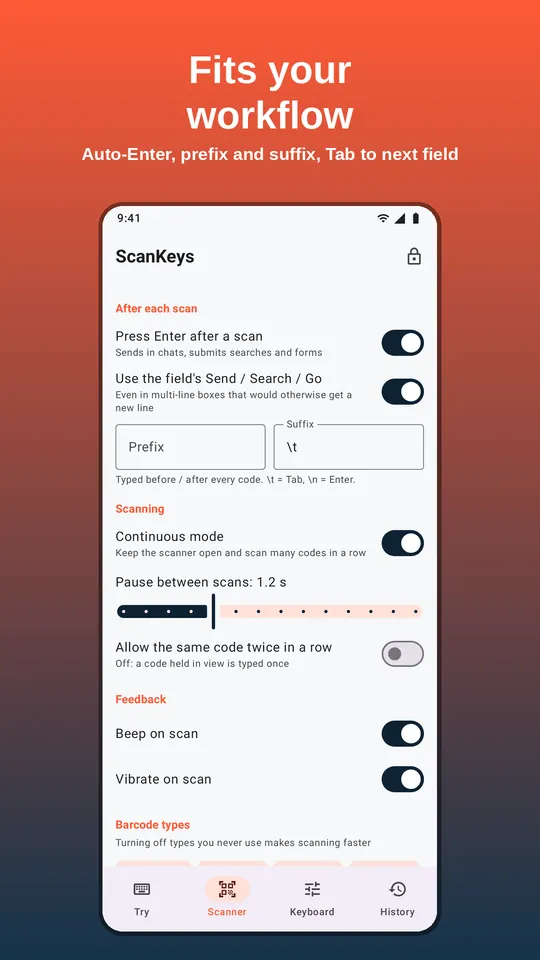
What happens after the code is typed decides whether scanning feels instant or fiddly. ScanKeys has four settings for it: Press Enter after a scan, smart submit, prefix and suffix.
The four settings
| Setting | What it does |
|---|---|
| Press Enter after a scan (on by default) | Presses Enter after the code: sends in chats, runs searches, submits single-line forms. |
| Use the field’s Send / Search / Go (smart submit, on) | When Enter is pressed after a scan, use the field’s own action button, even in multi-line boxes that would otherwise just get a new line. |
| Prefix | Text typed before every code. |
| Suffix | Text typed after every code. \t = Tab, \n = Enter. |
Recipes
Spreadsheet column
Enter after scan: on. Suffix: empty. Each code goes in a cell and the cursor drops to the next row. Sheets · Excel
Spreadsheet row
Enter after scan: off. Suffix: \t. Each code goes in a cell and the cursor moves right.
Search box (Shopify, eBay, POS)
Enter after scan: on. Smart submit: on. The search runs as soon as the code is read.
Web form, field by field
Enter after scan: off. Suffix: \t. Scan, and the cursor moves to the next field instead of submitting.
Chat message
Enter after scan: on to send each code at once, or off to add a note first.
Codes with a label
Prefix: SKU: . Suffix: \n. Types “SKU: 12345” and presses Enter.
Enter vs the field’s action
Android text fields can declare an action: Search, Send, Go, Next or Done. A plain Enter key press means different things in different fields: in a multi-line chat box it adds a new line instead of sending. With smart submit on, ScanKeys uses the field’s declared action after a scan, so a message is sent and a search runs even in apps whose message box is multi-line. When you type with the keyboard yourself, Enter still behaves normally. If you ever want a scan to add a new line in a chat instead of sending, turn smart submit off.
Testing your setup
Before a real job, open the app or form you will use and scan two or three codes from our barcode generator on your computer screen. Check that each code lands in the right cell or field, that the cursor ends up where the next scan should go, and that nothing is submitted early. If the cursor jumps one place too far, you probably have both a suffix and Enter after scan doing the same job; remove one. If a form submits too soon, switch Enter after scan off and use instead.
Prefix and suffix ideas
'as a prefix keeps leading zeros in spreadsheets.\t\tas a suffix skips two fields, for forms with a field you do not fill.,as a suffix with Enter off builds a comma-separated list in a single text box.\t1\nas a suffix types the code, Tab, a quantity of 1, and Enter, for a two-column count sheet.
Codes themselves are cleaned before typing: invisible control characters (such as the separators inside GS1 labels) are removed, and spaces at either end are trimmed, so only your prefix and suffix control what happens next.
Frequently asked questions
How do I type a real backslash in the prefix?
\\ types one backslash. \t and \n are the only other escapes.