
Continuous (batch) barcode scanning
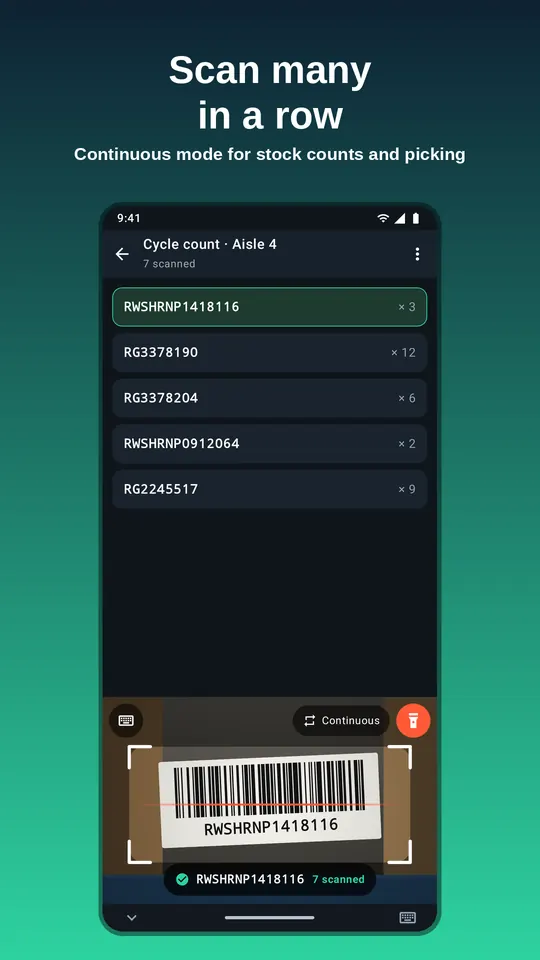
Continuous mode keeps the ScanKeys scanner open so you can scan label after label without touching the screen. It is the mode for counts, picking lists and long columns of codes.
Turn it on
- Tap a field and tap Scan.
- Tap the mode button in the scanner (it reads Single scan) to switch to Continuous. You can also turn on Continuous mode in ScanKeys settings so it is the default.
- Scan your first code, move to the next label, scan again. Each code is typed with your Enter, prefix and suffix settings.
Tune the rhythm: pause between scans
After a code is typed, ScanKeys waits a moment before it reads the next one. The default is 1.2 seconds. Set it in settings under Pause between scans:
- Shorter when labels are close together, such as a shelf edge or a box of parts.
- Longer when you pick up each item, or when you need to type a quantity between scans.
Duplicates and repeats
A phone camera sees the same label many times a second. The duplicate guard makes sure a code held in view is typed once, not dozens of times. That is right for bin labels and picking lists. For counting identical units, turn on Allow the same code twice in a row: each new scan of the same code is typed again (after the pause), so the count goes up.
ScanKeys also waits for a code to be read consistently over a couple of frames before typing it, which keeps half-seen codes out of your data.
Where to send a batch
- A spreadsheet column: Enter after scan on, one code per row. See Google Sheets.
- Your inventory system’s count screen: each scan submits a line.
- A plain text list: in a notes app, Enter after each scan builds a list you can paste anywhere.
- Inventory count mode (Pro): tallies per barcode and exports CSV. See the count CSV guide.
Daily limit on the free version
The free version includes 30 continuous scans per day, which is enough to try continuous mode on a real shelf or to scan a short list. Single scans (tap Scan, read one code) are never limited. When the daily allowance runs out, you can keep going with single scans, wait for tomorrow, or upgrade to ScanKeys Pro for unlimited continuous scanning, inventory count mode and export. If you only count stock occasionally, the monthly plan for a single month is the cheapest way to get through a big count.
Faster batches
- Switch off barcode types you do not need, so nearby codes are not typed.
- Keep the label you want in the centre of the frame.
- Use the torch in dim aisles; poor light is the most common cause of slow reads.
- Turn the beep on so you know a scan landed without looking at the screen.